
In Java, the char primitive type represents a single character. It can store letters, digits, and symbols using unicode, and occupies 2 bytes of memory.
Declaring a char
A char is declared using the char keyword. Its value is enclosed in single quotes (‘) — note that this is different from a String, which uses double quotes (“).
char letter = 'A';
char digit = '9';
char symbol = '@';
Common mistakes:
char c = "A";   // ❌ Wrong (String)
char c = 'AB';   // ❌ Too many characters
Getting the numeric value (unicode)
You can get the unicode numeric value of a character by casting it to int:
char letter = 'A';
System.out.println((int) letter); // 65
You can represent a character in unicode. Unicode characters can be written using \u followed by four hexadecimal digits.:
char letterA = '\u0041'; // A
System.out.println(letterA);
Why unicode matters
- Unicode supports many languages and symbols (e.g., accented letters, emojis, math symbols)
- ASCII is a subset of Unicode
- Java char supports values from 0 to 65535 (16-bit unicode)
Char limitations vs String
- A char stores only one 16-bit unicode code unit
- Although it works for most common characters, some characters (like emojis) require two char values (surrogate pairs)
Emoji Limitation:
char c = '😊'; // ❌ Compilation error
String emoji = "😊"; // ✅ Use String to store these characters:
System.out.println(emoji); // 😊
Rule of thumb:
- Use char for single letters, digits, symbols
- Use String for text, emojis, user input
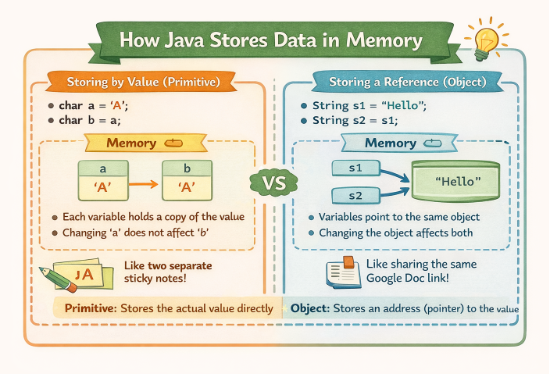
Primitive data type
- char is a primitive data type, and does not have methods
- char stores its value directly in memory, unlike Objects (like
String) which store a reference to the value
Character wrapper class
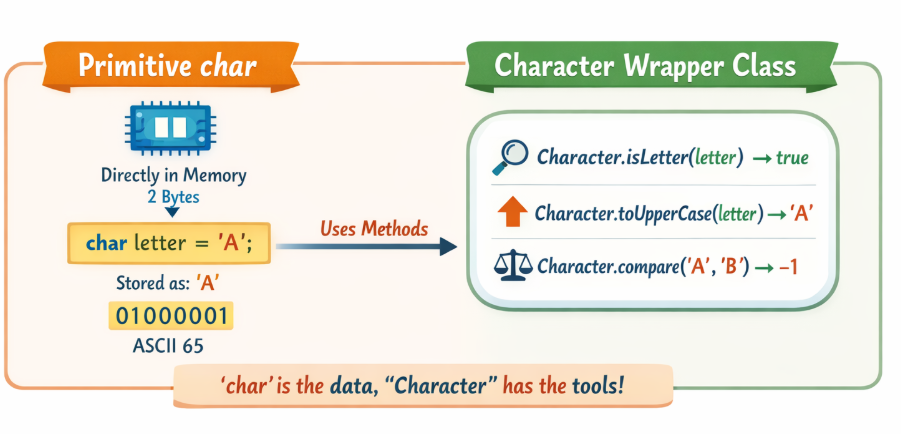
Although char has no methods, it has a wrapper class, Character, which provides methods that it can use.
Explanation:
- Primitive
char: Stores a single Unicode character directly in memory (2 bytes). - Wrapper class
Character: Provides methods to operate oncharvalues, such as checking, converting, or comparing characters.
Examples of Character methods
Checking / Validating
| Method | Example | Result |
isLetter | Character.isLetter('A') | Returns true or false |
| isDigit | Character.isDigit(‘7’) | Returns true or false |
| isLetterOrDigit | Character.isLetterOrDigit(‘7’) | Returns true or false |
| isUpperCase | Character.isUpperCase(‘A’) | Returns true or false |
| isLowerCase | Character.isLowerCase(‘a’) | Returns true or false |
Converting characters
| Method | Example | Result |
| toUpperCase | Character.toUpperCase(‘a’) | Converts lowercase to uppercase |
| toLowerCase | Character.toLowerCase(‘A’) | Converts uppercase to lowercase |
Compare characters
| Method | Example | Result |
| compare | Character.compare(‘a’, ‘b’) | Returns 0 if equal, negative if first < second, positive if first > second |
Converting strings to char[] array
String s = "hello";
char[] chars = s.toCharArray(); // {'h','e','l','l','o'}
This is useful when processing individual string characters.
Summary
- char stores a single character in memory
- char values use single quotes: ‘A’, ‘1’, ‘@’
- You can get a unicode value via casting to int
- char is a primitive and has no direct methods. It uses Character class wrapper methods
- A char stores only one 16-bit unicode code unit. Use String for more complex characters, like emojis
Leave a Reply